Coginiti MCP Server Reference
The Coginiti MCP server lets AI clients work with your connections, catalog and semantic layers through the Model Context Protocol (MCP). It runs inside Coginiti and exposes 16 tools over a single HTTP endpoint.
Overview
| Property | Value |
|---|---|
| Endpoint | /api/v1/mcp |
| Transport | Streamable HTTP |
| Authentication | Coginiti API key, sent as Authorization: Bearer <key> |
| Editions | Team, Enterprise |
| Default state | Enabled |
Coginiti Pro is not supported yet.
Every tool runs with the permissions of the API key's owner. Catalog edits follow that user's catalog permissions.
Authentication
Requests must carry a valid Coginiti API key in the Authorization header. To create a key, see the API reference.
Authorization: Bearer <your-api-key>
Key behavior:
- A key works until it expires or is deleted.
- Disabling a user suspends their API keys. While the user is disabled, the keys are rejected with
401. - When the user is enabled again, the same keys work again.
Disabling a user does not revoke their API keys. To end a user's access to MCP for good, delete their API keys as well as disabling the user.
Tools
The server provides 16 tools in four groups.
Connections and Databases
| Tool | Description |
|---|---|
list_connections | List the database connections available to you. |
browse_db | Browse a connection's databases, schemas, tables and columns, one level at a time. |
execute_sql | Run one SQL statement against a connection. |
execute_script | Run a saved catalog script, or one block of it, against a connection. |
Catalog
| Tool | Description |
|---|---|
list_catalog | List catalog items at a path, or the Project Hub packages. |
get_catalog_asset | Get an asset's content, metadata and revision. |
create_catalog_folder | Create a folder or project. |
create_catalog_asset | Create a SQL or CoginitiScript asset. |
update_catalog_folder | Rename a folder. |
update_catalog_asset | Rename an asset or replace its content. |
delete_catalog_folder | Delete an empty folder. |
delete_catalog_asset | Delete an asset. |
Search
| Tool | Description |
|---|---|
search | Search the catalog, query history and database objects. |
Semantic Layers
| Tool | Description |
|---|---|
list_semantic_layers | List the semantic layers you can access. |
get_semantic_layer_metadata | Get the entities, dimensions and measures of a layer. |
execute_semantic_query | Run a semantic-layer query. |
Tool Access Levels
Each tool declares what it does to Coginiti-managed state. Clients see this as MCP annotations.
| Level | Tools | Meaning |
|---|---|---|
| Read only | list_connections, browse_db, list_catalog, get_catalog_asset, search and the three semantic layer tools | Never changes anything. Clients may call these freely. |
| Read | execute_sql, execute_script | Runs your work against a connection. That work can change your databases, so clients are not told it is read only. |
| Write | create_*, update_* and delete_* catalog tools | Creates, changes or deletes catalog items. |
Tool Behavior
SQL and Scripts
Rules:
execute_sqlruns one statement per call. Input with several statements is rejected and nothing runs.execute_scriptruns one statement per call. A script with several top-level statements is rejected and nothing runs. To run part of a script, passblock.- On PostgreSQL,
DO $$ ... $$andCREATE FUNCTIONcount as several statements. So does SnowflakeEXECUTE IMMEDIATE $$ ... $$. They cannot run throughexecute_sqlyet. - The
paramsargument fills$nameparameters by plain text substitution. Values are not bound. - A script that has only named blocks has no default block. Pass
blockwith the block name. Only public blocks (names that start with a capital letter) can run. block_argsgives values for the declared parameters of the block, by parameter name. Every declared parameter needs a value. It works only withblock.project_versionselects the version of a Project Hub package. It works only on@Project Hubpaths.execute_scriptaccepts scripts only. It refuses project files, actions,linter.toml,.smdlfiles and folders.execute_sqldoes not limit the statement type.
Do not pass untrusted text in params. Values are substituted as plain text, so quote and check them.
Browsing a Database
browse_db lists one level at a time. Without path, it lists the top level. To go deeper, pass the path of a node from the previous result: database, schema, table, then columns.
If the database cannot be reached, the error names the connection and gives a short reason. It does not show driver details.
Catalog Paths and Revisions
Catalog paths start with a workspace, such as @Personal or @Shared.
get_catalog_asset and every write return the item's revision. The update and delete tools require the current revision. If the item changed since it was read, the call fails and does not overwrite the change. The client must read the item again before it retries.
get_catalog_asset cuts long content. It returns data.truncated and data.size_bytes.
Project Hub
Published Project Hub packages are read-only.
Rules:
list_catalogon@Project Hublists the packages with their versions and the latest version.- A package path is
@Project Hub/<package>. A script in it is@Project Hub/<package>/<script>. - The
project_versionargument selects a version. The default is the latest. It works only on@Project Hubpaths. - An unknown version returns
Project Hub path '...' does not contain version '...'.
Search
search can look in these sources:
| Source | Content |
|---|---|
| Catalog | Catalog items |
query_history | SQL that ran before |
platform_db_object | Indexed database objects |
Each hit has a short content snippet. Read the full content with get_catalog_asset. A catalog hit has a catalog_path that the catalog tools accept.
Semantic Queries
execute_semantic_query returns the same result fields as execute_sql, except it has no stats. A join can omit the ON condition, as in FROM fact AS f JOIN dim AS d. The semantic model supplies the join keys.
Large Results
Results are cut to protect the client. A cut result is a normal result, not an error.
| Tool | Cut by | Default | Maximum |
|---|---|---|---|
execute_sql, execute_script | Bytes only (no row limit) | 1,000,000 bytes | Set by an administrator |
execute_semantic_query | Rows only (no byte limit) | 1,000 rows | 10,000 rows |
Result fields:
| Field | Meaning |
|---|---|
returned | The number of rows in the response. |
truncated | true when rows were left out. |
truncated_by | bytes for SQL and scripts, rows for semantic queries. Present only when truncated is true. |
total | The number of rows. Present only when nothing was left out. |
When a result is cut, the real row count is not known and total is missing.
Decimals are JSON numbers that keep their scale. A SQL NULL is a JSON null.
The max_rows Argument
execute_semantic_query accepts max_rows, with a minimum of 1.
Rules:
- When omitted, the value is the Limit rows number to value in the system query execution settings, capped at the MCP maximum row limit. The default is 1,000.
- A value above the maximum row limit is rejected with
Invalid arguments: 'max_rows': must be at most <N>. It is not silently capped.
Administrator Settings
Administrators manage the server under Settings > MCP Server. Changes apply to new tool calls after you save them. You do not need to restart the server.
| Setting | Description | Default |
|---|---|---|
| Enable MCP server | Turns the endpoint on or off. When off, requests receive "Not found". | On |
| Max result size (bytes) | Byte limit for execute_sql and execute_script results. | 1,000,000 |
| Maximum row limit | Largest max_rows a caller can request. | 10,000 |
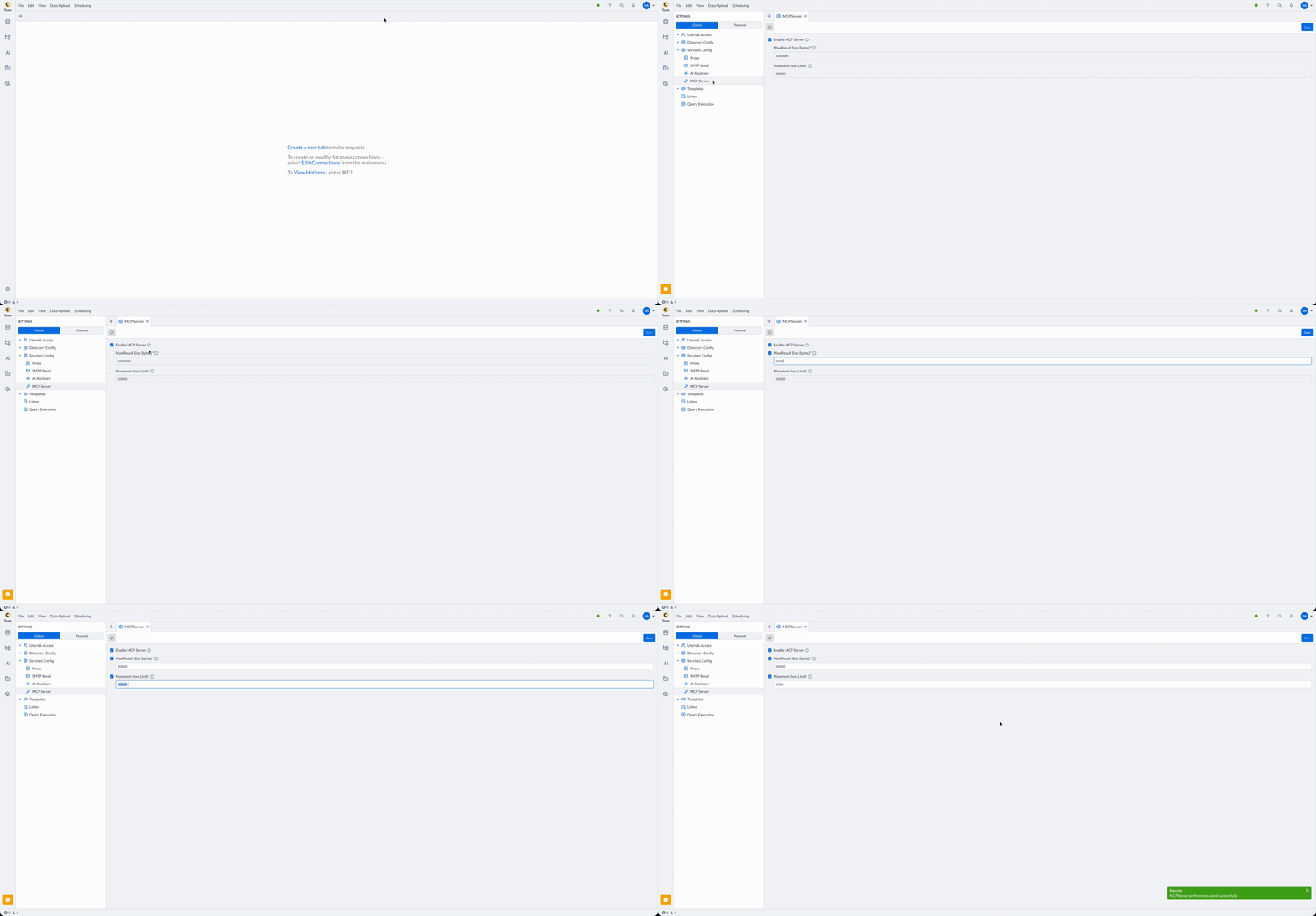
All three are system-wide settings. Users cannot override them in their own preferences.
Error Messages
| Message | Cause |
|---|---|
401 | The API key is missing, revoked or expired, or its owner is disabled. A key works again when its owner is enabled. |
404 / Not found | The MCP server is disabled, or the URL is wrong. |
403 | The user must sign in to the web UI once, or change the password if asked. |
Invalid arguments: ... | A required argument is missing or wrong. The message names the argument. |
The input has N statements, but only one statement can run per call | More than one statement was sent to execute_sql. |
The script has N statements, but execute_script runs only one per call | The script has several top-level statements and no block was given. Run the statements one at a time with execute_sql, or put them in named blocks and pass block. |
The script has only named code blocks, so there is no default block to run | execute_script ran a script with only named blocks and no block argument. |
'<path>' is not an executable script | execute_script was pointed at a file that is not a script. |
Audit and Security Log
Each tool call writes a McpToolCalled event (Event ID 26) to the security log. SQL that runs through execute_sql, execute_script and execute_semantic_query is also recorded in the query audit with the origin MCP.
For other security events, see the Security Log Reference.
For related guides, see:
Connect Claude Desktop to Coginiti
Connect Claude Code to Coginiti
Connect Codex CLI to Coginiti
Connect Codex Desktop to Coginiti
Connect Other AI Clients to Coginiti
For more information about other exciting Coginiti features visit our documentation