Coginiti Actions Reference
Coginiti Actions are automated workflows defined in TOML format that execute SQL assets in sequence or in parallel based on job dependencies.
File Structure
An actions file contains a required [general] section, optional [environment], [schedule], and [trigger] sections, and one or more [job.job_name] sections for execution logic.
[general]
# Workflow metadata (required)

[environment]
# Database environment (optional)

[schedule]
# Time-based execution schedule (optional)

[trigger]
# Event-based execution triggers (optional)

[job.job_name]
# Job configuration (required)

[job.another_job]
# Another job configuration
Section headers use square brackets ([section])
Job sections use dot notation ([job.job_name])
All string values must be quoted (name = "value")
Arrays use square brackets (depends_on = ["job1", "job2"])
General Section
The [general] section contains workflow-level metadata.
Fields:
name(required) — Unique identifier for the action.
Example:name = "daily_sales_pipeline"description(optional) — Human-readable description of the workflow's purpose.
Example:description = "Process daily sales data for reporting"
[general]
    name = "customer_etl_pipeline"
    description = "Extract, transform, and load customer data from multiple sources"
Environment Section
The [environment] section is optional. When present, it specifies which project environment to use for database connections. The environment ID must match one defined in the project's project.toml.
Fields:
id(required when section present) — the environment ID fromproject.toml. Example:id = "prod"
[environment]
    id = "prod"
More about environments: Coginiti Environments
If [environment] is omitted, the connection must be selected manually when scheduling the action.
Schedule Section
The [schedule] section is optional. When present, cron and misfire_policy are required; timezone is optional but recommended for clarity.
Fields:
cron(required when section present) — cron expression defining when the action runs.
Format:"sec min hour day month dayOfWeek"
Example:cron = "0 15 20 * * ?"— runs at 20:15 every daymisfire_policy(required when section present) — behavior when a scheduled execution is missed.
Valid values:"RUN_IMMEDIATELY","SKIP"timezone(optional) — IANA timezone identifier. DST rules are applied automatically.
Example:timezone = "Europe/Helsinki"
Defaults to the user's timezone if omitted.
[schedule]
    cron = "0 15 20 * * ?"        # sec min hour day month dayOfWeek — runs at 20:15 daily
    misfire_policy = "RUN_IMMEDIATELY"
    timezone = "Europe/Helsinki"
Cron format: sec min hour day month dayOfWeek
More about cron expressions: Quartz Cron Trigger
misfire_policy values:
| Value | Behavior |
|---|---|
RUN_IMMEDIATELY | Execute as soon as possible if the scheduled time was missed |
SKIP | Skip the missed execution and wait for the next scheduled time |
Timezone: Use IANA timezone identifiers. Common examples:
- Americas:
America/New_York,America/Chicago,America/Los_Angeles - Europe:
Europe/London,Europe/Paris,Europe/Helsinki - Asia:
Asia/Tokyo,Asia/Singapore,Asia/Dubai - UTC offsets:
GMT+1,UTC-5,+05:30
If a non-IANA timezone format is used (e.g., a plain UTC offset), a DST notification will appear in the Scheduler.

Trigger Section
The [trigger] section is optional. When present, the action runs automatically in response to project events instead of (or in addition to) a time-based schedule. When present, types is required.
Fields:
types(required when section present) — Array of one or more event types that trigger the action. Must contain at least one entry, and every value must be a recognized trigger type.
Example:types = ["review_created", "project_hub_published"]
[trigger]
    types = ["review_created", "project_hub_published"]
Trigger types:
| Value | Action runs when |
|---|---|
review_created | A project review is created |
project_hub_published | The project is published to the Project Hub |
[schedule] and [trigger] are independent. An action can define a schedule, triggers, both, or neither.
Use [schedule] for time-based runs and/or [trigger] for event-based runs.
Triggered executions run under the action owner's identity and resolve the connection and environment the same way scheduled executions do. When an action lists multiple types, any one of those events starts a run.
Job Sections
Each job is defined as [job.job_name] where job_name is a unique identifier within the file.
Fields:
steps(required) — Array of step names to execute in sequential order.
Example:steps = ["extract_data", "validate_data", "transform_data"]depends_on(optional) — Array of job names that must complete successfully before this job runs.
Example:depends_on = ["extract_job", "validation_job"]
[job.data_processing]
    depends_on = ["data_extraction"]
    steps = ["clean_data", "validate_data", "enrich_data"]
Step Definitions
Each step referenced in a job's steps array must have a corresponding inline definition within the same job section.
Step syntax:
step_name = { command = "command_type", asset = "/asset_path", parameters = { } }
Fields:
command(required) — The command type to execute.
Valid values:"run_asset"asset(required) — Absolute path to the SQL asset in the catalog, starting with/.
Example:asset = "/reports/daily_summary"parameters(optional) — Key-value pairs to pass to the SQL asset.
Format:{ "$param_name" = "value" }
Simple step:
extract_data = { command = "run_asset", asset = "/etl/extract" }
Step with parameters:
daily_report = { command = "run_asset", asset = "/reports/daily", parameters = { "$report_date" = "2024-01-15", "$department" = "sales", "$limit" = "1000" } }
Parameters
Parameters enable dynamic value substitution in SQL assets.
- Naming: Must start with
$followed by the parameter name. (or$$, depends on user's Query Execution Settings) - SQL usage: Reference in SQL as
'$parameter_name' - TOML definition:
"$parameter_name" = "value"
Parameter types:
# String
parameters = { "$customer_name" = "Real Corp" }

# Date range
parameters = { "$start_date" = "2024-01-01", "$end_date" = "2024-01-31" }

# Numeric
parameters = { "$threshold" = "100", "$limit" = "5000" }
parameters are mandatory for scripts that are using them. In case of missing - execution will fail.
Job Dependencies
Jobs declare dependencies using depends_on. Jobs with no depends_on run in parallel at the start of execution;
jobs with dependencies run only after all listed jobs complete successfully.
Dependency rules:
- Job names in
depends_onmust exactly match job names defined in the same file - Circular dependencies are not allowed
- A job can depend on multiple other jobs
- Multiple jobs can depend on the same job
Single dependency:
[job.transform]
    depends_on = ["extract"]
    steps = ["transform"]
    transform = { command = "run_asset", asset = "/etl/transform" }
Multiple dependencies:
[job.report]
    depends_on = ["sales_data", "customer_data", "inventory_data"]
    steps = ["create_report"]
    create_report = { command = "run_asset", asset = "/reports/combined_report" }
Chain dependencies:
[job.extract]
    steps = ["extract"]
    extract = { command = "run_asset", asset = "/etl/extract" }

[job.transform]
    depends_on = ["extract"]
    steps = ["transform"]
    transform = { command = "run_asset", asset = "/etl/transform" }

[job.load]
    depends_on = ["transform"]
    steps = ["load"]
    load = { command = "run_asset", asset = "/etl/load" }
Naming Conventions
- Job names: Lowercase with underscores (
data_processing) - Step names: Lowercase with underscores (
extract_data) - Parameter names: Start with
$/$$($report_date)
Complete Configuration Examples
Simple linear pipeline
[general]
    name = "simple_etl"
    description = "Basic ETL pipeline for customer data"

[job.extract]
    steps = ["extract_customers"]
    extract_customers = { command = "run_asset", asset = "/etl/extract_customers" }

[job.transform]
    depends_on = ["extract"]
    steps = ["transform_customers"]
    transform_customers = { command = "run_asset", asset = "/etl/transform_customers" }

[job.load]
    depends_on = ["transform"]
    steps = ["load_customers"]
    load_customers = { command = "run_asset", asset = "/etl/load_customers" }
Parallel processing pipeline
[general]
    name = "parallel_processing"
    description = "Process multiple data sources in parallel"

[job.process_sales]
    steps = ["extract_sales", "transform_sales"]
    extract_sales = { command = "run_asset", asset = "/data/extract_sales" }
    transform_sales = { command = "run_asset", asset = "/data/transform_sales" }

[job.process_customers]
    steps = ["extract_customers", "transform_customers"]
    extract_customers = { command = "run_asset", asset = "/data/extract_customers" }
    transform_customers = { command = "run_asset", asset = "/data/transform_customers" }

[job.generate_report]
    depends_on = ["process_sales", "process_customers"]
    steps = ["create_report"]
    create_report = { command = "run_asset", asset = "/reports/combined_report" }
Scheduled pipeline with environment and schedule
[general]
    name = "daily_sales_pipeline"
    description = "Nightly sales data pipeline with automated reporting"

[environment]
    id = "production"

[schedule]
    cron = "0 0 2 * * ?"          # sec min hour day month dayOfWeek — runs at 02:00 daily
    misfire_policy = "RUN_IMMEDIATELY"
    timezone = "America/New_York"

[job.extract]
    steps = ["extract_sales"]
    extract_sales = { command = "run_asset", asset = "/etl/extract_sales" }

[job.transform]
    depends_on = ["extract"]
    steps = ["transform_sales"]
    transform_sales = { command = "run_asset", asset = "/etl/transform_sales" }

[job.report]
    depends_on = ["transform"]
    steps = ["daily_summary"]
    daily_summary = { command = "run_asset", asset = "/reports/daily_summary", parameters = { "$report_date" = "2024-01-15", "$region" = "north_america" } }
Event-triggered pipeline
[general]
    name = "review_validation"
    description = "Validate data automatically whenever a project review is created"

[environment]
    id = "production"

[trigger]
    types = ["review_created"]

[job.validate]
    steps = ["run_checks"]
    run_checks = { command = "run_asset", asset = "/quality/review_checks" }
Scheduled and triggered pipeline
[general]
    name = "publish_refresh"
    description = "Refresh published datasets nightly and on every hub publish"

[schedule]
    cron = "0 0 1 * * ?"          # sec min hour day month dayOfWeek — runs at 01:00 daily
    misfire_policy = "SKIP"
    timezone = "UTC"

[trigger]
    types = ["project_hub_published"]

[job.refresh]
    steps = ["rebuild_datasets"]
    rebuild_datasets = { command = "run_asset", asset = "/publish/rebuild" }
Complex multi-branch pipeline
[general]
    name = "complex_analytics"
    description = "Multi-stage analytics pipeline with quality checks"

[job.data_ingestion]
    steps = ["ingest_raw_data", "initial_validation"]
    ingest_raw_data = { command = "run_asset", asset = "/ingestion/ingest" }
    initial_validation = { command = "run_asset", asset = "/quality/initial_check" }

[job.sales_processing]
    depends_on = ["data_ingestion"]
    steps = ["process_sales", "validate_sales"]
    process_sales = { command = "run_asset", asset = "/processing/sales" }
    validate_sales = { command = "run_asset", asset = "/quality/sales_validation" }

[job.customer_processing]
    depends_on = ["data_ingestion"]
    steps = ["process_customers", "validate_customers"]
    process_customers = { command = "run_asset", asset = "/processing/customers" }
    validate_customers = { command = "run_asset", asset = "/quality/customer_validation" }

[job.data_enrichment]
    depends_on = ["sales_processing", "customer_processing"]
    steps = ["enrich_data", "calculate_metrics"]
    enrich_data = { command = "run_asset", asset = "/enrichment/enrich" }
    calculate_metrics = { command = "run_asset", asset = "/metrics/calculate" }

[job.quality_assurance]
    depends_on = ["data_enrichment"]
    steps = ["final_validation", "data_profiling"]
    final_validation = { command = "run_asset", asset = "/quality/final_check" }
    data_profiling = { command = "run_asset", asset = "/quality/profile" }

[job.reporting]
    depends_on = ["quality_assurance"]
    steps = ["executive_summary", "detailed_report", "data_export"]
    executive_summary = { command = "run_asset", asset = "/reports/executive" }
    detailed_report = { command = "run_asset", asset = "/reports/detailed" }
    data_export = { command = "run_asset", asset = "/export/final_export" }
Running Actions Manually
Beyond [schedule] and [trigger], an action can be run on demand from the editor toolbar:
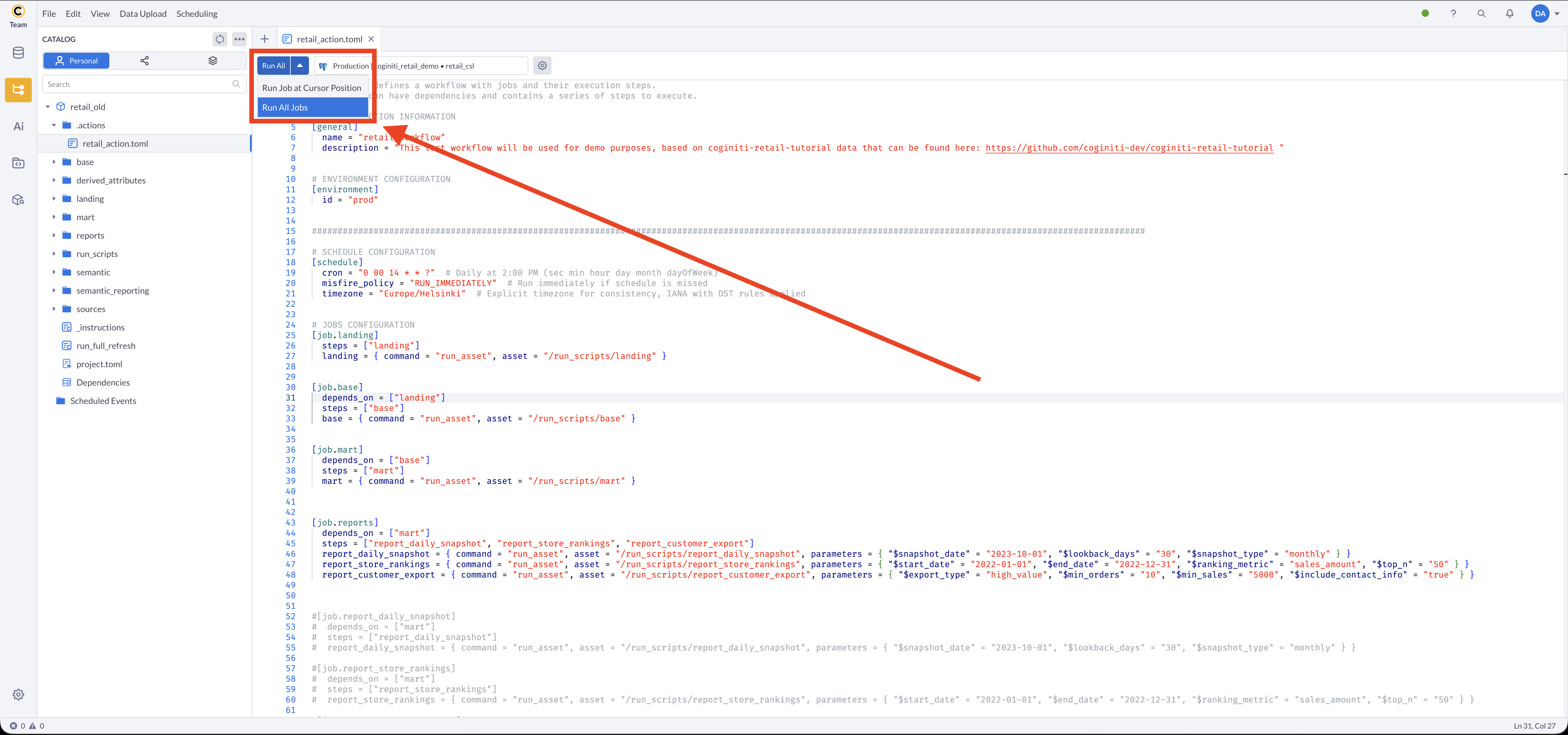
| Button | Behavior |
|---|---|
| Run all jobs | Executes every [job.*] in the file, respecting depends_on ordering |
| Run job at current position | Executes only the single job identified by the cursor's location |
Run job at current position requires the cursor to be placed directly on the job's header line — inside the [job.job_name] brackets. Placing the cursor elsewhere in the job's body (a steps or step-definition line) does not select the job.
If the cursor is not on a job header line, an error will be displayed.
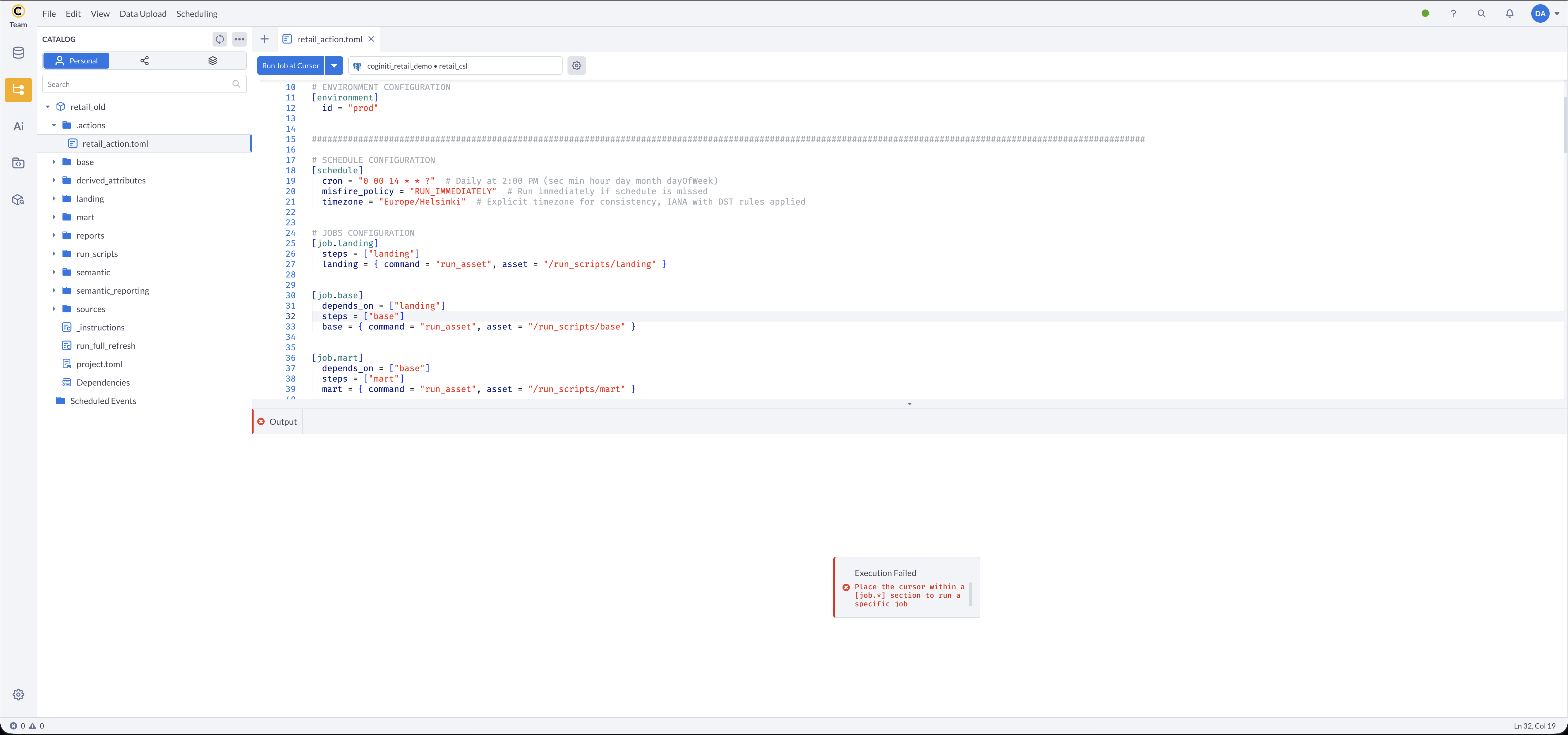
Manual runs execute immediately using the configured environment and connection.
Validation Rules
Configuration Validation
- The
[general]section must contain anamefield - When
[environment]is present,idis required and must match an environment inproject.toml - When
[schedule]is present, bothcronandmisfire_policyare required - When
[trigger]is present,typesis required, must be an array, and must contain at least one non-blank value - Every value in
[trigger]typesmust be a recognized trigger type (review_createdorproject_hub_published) - Each job must have a
stepsarray - All steps listed in
stepsmust have inline definitions within the same job section - All
depends_onreferences must point to existing job names in the same file - Circular dependencies are not allowed
Runtime Validation
- All referenced assets must exist in the catalog
- The user must have access to all referenced assets
- Parameter values must satisfy the SQL asset's parameter requirements
- Required database connections must be available
Best Practices
Organization
- Use descriptive job and step names that reflect the operation performed
- Group related steps into logical jobs that represent a single stage of the pipeline
- Keep job dependencies explicit and minimal to maximize parallel execution
Parameters
- Parameters are mandatory for assets using them
- Define parameters in TOML for static values known at configuration time
- Use consistent parameter naming across all workflows in a project
Performance
- Avoid unnecessary
depends_onentries that prevent jobs from running in parallel - Keep individual steps focused on a single operation
- Use appropriate indexing in SQL assets referenced by steps
For related guides, see Coginiti Actions.
For more information about other exciting Coginiti features visit our documentation